

Custom Segment LCD Displays: A Buyer's Guide to Design, Cost & Sourcing
09.02.2026
If you're building a fuel dispenser, a smart meter, a medical monitor, or any industrial device, chances are a standard off-the-shelf display doesn't fit your interface. That's where a custom segment LCD comes in. This guide walks you through what it is, how to design one, what it costs, and how the sourcing process actually works — so you can talk to a supplier with confidence instead of guessing.
What Is a Custom Segment LCD?
Custom segment LCD: a liquid crystal display built from fixed shapes — digits, icons, or symbols — where each shape (or "segment") can be turned on or off independently to show a specific piece of information.
Unlike a graphic or TFT display, a segment LCD doesn't render arbitrary images pixel by pixel. It shows a fixed set of pre-designed elements. Think of a gas pump's price display, or the battery icon on an electric meter — every shape you see was drawn into the glass at the design stage, not generated in real time.
A few terms come up constantly when you start a project like this:
Segment: the smallest controllable unit on the display. It can be a digit, a bar, a dot, or a custom icon.
Common line: the electrical connection shared by multiple segments on the same voltage group.
Segment line: the electrical connection dedicated to a single segment.
Icon: a fixed silhouette — a battery symbol, a wrench, a flame — placed directly on the glass to represent a status or function.
Because every shape is custom-drawn, you're not limited to standard digit fonts or layouts. You can combine numeric digits, icons, and bar graphs on a single piece of glass, laid out exactly to match your product's front panel.
This is also why segment LCDs remain a strong choice for fuel dispenser, meter, smart home, and hand-held device applications: the interface rarely changes once it's designed, and the display just needs to show it reliably for years, at low power draw.
Segment LCD vs. TFT vs. OLED: Which One Fits Your Product?
Before you commit to a segment LCD, it's worth confirming it's actually the right technology for your interface. Here's how the three most common options compare for industrial and non-consumer applications:
Factor | Segment LCD | TFT LCD | OLED |
Content type | Fixed digits, icons, symbols | Full graphics, video, UI | Full graphics, high contrast |
Power draw | Very low (often under 1mA) | Moderate to high | Moderate, higher at full brightness |
Sunlight readability | Excellent (reflective/transflective) | Requires high-brightness backlight | Poor in direct sunlight |
Tooling cost | Low | Moderate to high | Moderate to high |
Design flexibility | Fixed layout, set at tooling | Fully dynamic UI | Fully dynamic UI |
Typical lifecycle | Very long, stable supply | Shorter component cycles | Shorter component cycles |
Best fit | Meters, fuel dispensers, simple HMI, wearables | Dashboards, control panels needing graphics | Premium indicators, low-light interfaces |
Q: If my product needs some graphics later, should I still choose segment LCD now?
A: If your interface is genuinely fixed — numbers, status icons, a few symbols — segment LCD gives you lower cost and lower power for the life of the product. If you expect the UI to evolve, a small TFT module is usually the safer long-term choice.
Segment LCD wins when your priority is long-term supply stability, low power, and outdoor visibility — which is why it's still the default choice across fuel dispensers, water/gas/electric meters, and industrial control panels, even as TFT prices have come down.
Key Design Considerations Before You Customize
Once you've confirmed segment LCD is the right fit, a handful of decisions determine how your display performs in the field.
Optical Mode: TN vs. STN vs. FSTN vs. VA
Optical mode: the liquid crystal technology that determines contrast, viewing angle, and visual style of the display.
· TN (Twisted Nematic): the most common and most affordable mode. Good for straightforward digit/icon displays viewed head-on.
· STN (Super Twisted Nematic): better contrast and wider viewing angle than TN, at a modest cost increase.
· FSTN (Film-compensated STN): adds a retardation film for a true black-on-white or black-on-gray appearance instead of STN's typical blue tint — a common choice when a cleaner, more "premium" look matters.
· VA (Vertical Alignment): the darkest background and best contrast of the group, often used when a display needs to look closer to a dark-mode or negative-image style.
Choosing the right mode early avoids a costly redesign — once the artwork and tooling are locked in, changing optical mode usually means starting over.
Outdoor Visibility & Operating Temperature Range
If your device runs outdoors or in an unconditioned environment — a fuel dispenser, an EV charger, a piece of field equipment — two specs matter more than anything else:
· Wide operating temperature range: standard LCDs are typically rated for indoor conditions; outdoor-grade fluid formulations extend usable range to withstand summer heat and winter cold without the display slowing down or going dark.
· Sunlight readability: reflective or transflective segment LCDs stay legible in direct sun, unlike most backlit graphic displays, which is a major reason segment LCD is still standard for pump and charger displays.
Interface, Icons & Custom Symbol Design
Segment LCDs typically connect through one of a few interface types:
· Direct drive (pin or zebra connector) for simple, low-segment-count displays
· FPC (flexible printed circuit) cable for more complex layouts or where space is tight
· A driver IC with SPI/parallel interface, for displays with a higher segment count
Icon and symbol design deserves attention too. Keep shapes clean and avoid overly fine detail — a segment LCD isn't a graphic display, and shapes that look sharp in a vector file can blur or lose definition once etched onto glass at production scale.
Cost, MOQ & Lead Time: What to Expect
One of the most common questions we hear is simply: how much does a custom segment LCD actually cost? The honest answer is "it depends" — but here's what it depends on.
Cost driver | Impact |
Segment count & complexity | More segments and finer icon detail increase tooling cost |
Optical mode | TN is the most affordable; STN/FSTN/VA cost incrementally more |
Backlight | Adding backlight increases both tooling and per-unit cost |
Wide temperature fluid | Outdoor-grade fluid adds a modest premium over standard indoor fluid |
Interface type | Direct drive is cheapest; driver IC with FPC adds cost |
Touch integration | Adding a touch panel significantly increases both tooling and unit cost |
Q: What's a realistic tooling (NRE) budget for a first custom segment LCD project?
A: It depends on segment count, optical mode, and whether backlight or wide-temperature fluid is required — which is exactly why tooling is quoted per design rather than listed as a fixed price. As a general pattern, simple TN designs sit at the lower end, while backlit, wide-temperature, or touch-integrated designs land higher. Sharing your outline size and rough segment layout is enough to get a project-specific number.
Q: What MOQ should I plan for?
A: MOQ is set per project based on panel size, complexity, and production process, so it's worth confirming directly against your actual design rather than assuming a fixed figure applies. Tell us your target volume and we'll size the MOQ tiers around it, not the other way around.
Q: How long does it take from confirmed design to first samples?
A: Lead time depends on how complex the drawing is and current tooling capacity, so it's best confirmed once your specifications are locked in. In general, simpler TN designs move faster through tooling than backlit or touch-integrated ones.
One thing worth remembering: tooling is a one-time investment. Once it's paid, the mold and design are yours, and per-unit cost is generally very low compared to the display technologies you'd otherwise consider. For companies building industrial control HMI panels or fuel dispenser interfaces, this is often what makes segment LCD the most cost-stable option over a multi-year product lifecycle. Because every project's cost profile is different, the most reliable way to get real numbers is to request a quote based on your actual design.
From Drawing to Mass Production: The Development Process
Custom segment LCD projects follow a fairly consistent path, whether it's your first project or your fifteenth:
1. Requirement gathering — you share your outline size, viewing area, segment layout (or a rough sketch), operating voltage, temperature range, and interface preference.
2. Drawing and layout proposal — the supplier translates your requirements into a technical drawing showing exact segment shapes, common/segment line assignments, and panel outline.
3. Drawing confirmation — you review and sign off on the drawing. This step matters more than any other: once approved, it becomes the basis for tooling.
4. Tooling / mold development — the mold and production tooling are built specifically for your design.
5. Sample production and verification — first samples are produced for you to test fit, function, and visual quality against your product.
6. Mass production — once samples are approved, the display moves into scheduled production runs against your forecast or purchase orders.
Most delays in this process come from incomplete specifications at step 1 or unclear icon artwork — which is why a supplier with genuine display engineering experience, not just a broker relaying your file to a factory, makes a measurable difference in how smoothly your project moves from drawing to shipment.
Case Study: Custom Segment LCD for Fuel Dispenser Equipment
A fuel dispenser manufacturer needed to replace an existing display without redesigning the rest of the unit — the new segment LCD had to drop into the same PCB mounting space and work with the same electrical interface as the outgoing display.
We developed a multi-zone 7-segment LCD combining large numerical digits for fuel volume and transaction data with an auxiliary numerical zone for additional operating information. Because the display runs outdoors at the pump, both viewing performance and temperature range were treated as core requirements, not add-ons.
Spec | Detail |
Application | Fuel dispenser, outdoor fueling environment |
Display type | Multi-zone 7-segment LCD |
Panel technology | TN/HTN positive, transflective |
Viewing direction | 6 o'clock |
Operating temperature | -20°C to +70°C |
Backlight | LED |
Final build | Custom segment LCD + customized pin layout + integrated driver PCB |
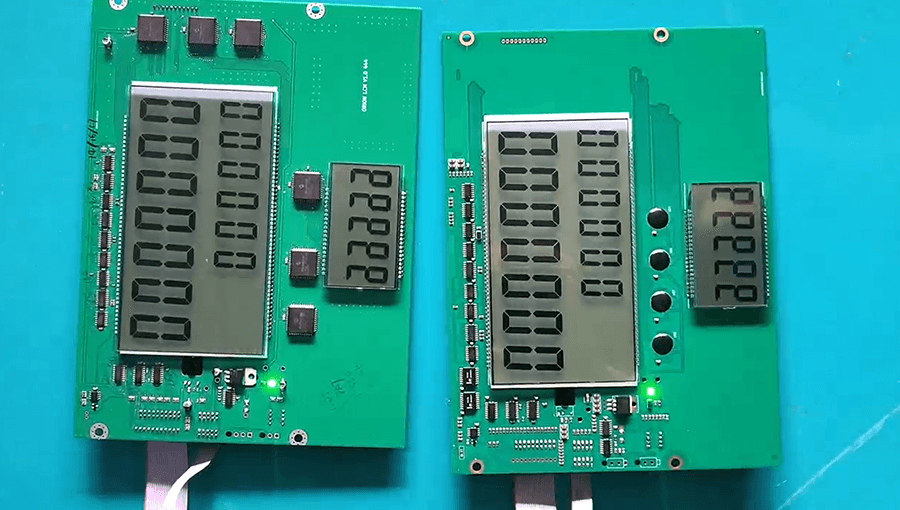
Result: the customized display fit directly into the customer's existing enclosure and PCB architecture — no mechanical redesign needed — while delivering clear numerical readability and stable operation for continuous, all-weather fuel dispensing use.
This kind of project illustrates a pattern we see repeatedly: the technical challenge is rarely "can this be built," it's "can this be built to match an existing footprint, survive outdoor conditions, and run reliably for years without a redesign." That's the standard our custom display solutions are built around.
FAQ: Common Questions About Custom Segment LCDs
Q: Can I customize an existing standard segment LCD instead of designing from scratch?
A: Sometimes. If a standard module is close to your layout, minor modifications can be faster and cheaper than a full custom design. If your interface has unique icons or an unusual outline, a full custom design is usually more reliable long-term.
Q: Do I need a finished product design before contacting a supplier?
A: No. A sketch, a rough outline size, and a list of what needs to appear on the display is enough to start a conversation. Full drawings come later, after initial requirements are confirmed.
Q: What happens if I need to change the design after tooling is built?
A: Minor changes are sometimes possible, but significant layout changes typically require new tooling. This is why drawing confirmation before tooling is the most important checkpoint in the whole process.
Q: Is segment LCD still relevant given how cheap small TFT modules have become?
A: Yes — particularly for outdoor, battery-powered, or long-lifecycle products. Segment LCD still outperforms TFT on power draw, sunlight readability, and long-term component availability, which matters for products with 5–10 year service lives.
Q: Can a custom segment LCD include both digits and icons on the same panel?
A: Yes. Digits, icons, bar graphs, and custom symbols can all be combined on a single piece of glass, as long as they're planned together at the drawing stage.
If you're evaluating a custom segment LCD for your next product, our team can review your requirements and walk you through drawing, tooling, and sample timelines. Get in touch with our display engineering team to start the conversation.