

ILI9341 TFT Displays: An Industrial OEM Selection Guide
10.28.2026
Short answer: An ILI9341 TFT display is a small color screen built around the ILI9341 driver IC. It is a solid starting point for QVGA-class (240×320) industrial interfaces. But the IC does not decide whether the display survives in the field. The panel, the interface and the supply chain do.
This guide is for hardware engineers, product managers and buyers. You have seen the ILI9341 on a dev board. Now you need to decide if it belongs in your product.
What Is an ILI9341 TFT Display?
ILI9341: A single-chip driver IC for a-Si TFT LCD panels. It drives 240 RGB × 320 pixels at up to 262K colors.
The ILI9341 is the controller, not the screen. A finished module combines the driver IC, the TFT glass, the backlight and an optional touch layer. Viewing angle, brightness and temperature range come from the panel and backlight, not the IC.
ILI9341 Key Specs at a Glance
Item | ILI9341 |
Resolution | 240 RGB × 320 |
Color depth | Up to 262K colors |
Display RAM | 172,800 bytes (on-chip) |
MCU interface | 8/9/16/18-bit parallel (8080 series), 3/4-line SPI |
RGB interface | 6/16/18-bit |
Logic supply (VDDI) | 1.65 V – 3.3 V |
Analog supply (VCI) | 2.5 V – 3.3 V |
Power saving | Sleep mode, 8-color idle mode |
Two features help in real designs. The on-chip RAM holds the full frame, so your MCU does not refresh the panel continuously. Window addressing lets you update one region without redrawing the screen.
Q: Does the ILI9341 decide image quality?
A: No. The panel, backlight and glass design decide it. When you compare suppliers, ask for brightness, viewing direction, operating temperature and backlight lifetime next to the IC name.
SPI, 8080 or RGB: Which Interface Fits Your Design?
Pick the interface first. It sets your pin count, refresh speed and MCU choice.
Interface | Strength | Trade-off | Best for |
3/4-line SPI | Few pins (about 4 I/O minimum) | Slowest data path | Static or slow-changing screens |
8080 parallel (8–18 bit) | Faster transfer | Many more pins | Menus, graphs, mixed content |
RGB (6/16/18 bit) | Continuous pixel stream | Needs a controller with RGB output | Video-style updates |
How Fast Can SPI Refresh a 320×240 Screen?
Do the math before you commit.
· Pixels: 320 × 240 = 76,800
· Bits per pixel (RGB565): 16
· Bits per full frame: 1,228,800
SPI clock | Time per full frame | Approx. frames/s |
10 MHz | ~123 ms | ~8 |
20 MHz | ~61 ms | ~16 |
40 MHz | ~31 ms | ~32 |
These are ideal numbers. Real throughput is lower because of command overhead and MCU speed. Check the maximum clock in the datasheet for your module, too.
What Bench Tests Show: Clock Speed Is Not Smoothness
Short answer: The SPI clock sets the ceiling. It does not set how smooth the screen feels.
Our bench notes use 4-wire SPI, RGB565 and a 240×240 full-screen redraw. The controllers are ST7789-class, similar to the ILI9341. The MCUs were ESP32-S3, STM32F4/F7 and RP2040 class.
Setup | Typical full-screen result |
40 MHz, CPU polling | 15–22 fps, visible stutter |
40 MHz, hardware SPI + DMA | 30–38 fps |
Software (bit-banged) SPI | Under 8 MHz, stutters on any animation |
Without DMA, a logic analyzer shows idle gaps between bytes. A high clock without DMA is fast on paper only. With DMA, 30–40 MHz is the sweet spot for most small panels. Past about 35 fps, a faster clock adds little. In customer tests, moving from 40 MHz to 60 MHz gained only 2–4 fps. We do not suggest planning around out-of-spec clocks.
Q: Why does the screen tear even at a high clock?
A: The panel scans at its own fixed rate, often 60 Hz on small drivers. If one frame takes longer than about 16.7 ms to send, tearing stays. At 40 MHz, a 240×320 frame takes about 31 ms. The TE (tearing effect) pin helps only when the transfer fits inside the blanking window.
Our recommended order of optimization:
1. Partial refresh first. Redraw only the changed area. At 20 MHz, a small region can run near 60 Hz. That beats a 40 MHz full-screen redraw.
2. Turn on DMA. Some libraries default to CPU polling. Then changing the clock changes nothing.
3. Raise the clock last. Higher clocks add power draw and noise risk.
Field notes:
· Keep the DC pin. 3-wire 9-bit SPI costs frame rate at the same clock.
· Mind the signal path. Above 40 MHz, keep traces under about 5 cm and add a 22 Ω series resistor near the MCU.
· Test your own build. Modules from different suppliers can behave differently at the same clock.
When to switch interface: For static or partial-update screens, SPI at 20–32 MHz with DMA works well. For frequent full-screen animation, use parallel. At 320×480 and above, SPI cannot deliver smooth full-screen motion. Choose parallel or RGB.
Where ILI9341 Displays Work in Industrial Equipment
A 240×320 color screen fits devices that show a few things clearly. It is not built for dense dashboards.
Application | Why QVGA fits | What to check |
Handheld test tools | Compact, low pin count | Power draw, sunlight readability |
Meters and instrument panels | Status, trend and menu screens | Backlight life, temperature range |
Small HMI panels | Parameters and simple graphics | Touch option, viewing angle |
EV charger status displays | Charge state, simple prompts | Outdoor brightness, cover glass |
When you need more content on screen, move up in size or resolution. Our TFT Display series covers a range of both. For simple fixed readouts, COG or segment LCD often uses less power. Pick the display for the content.
Application Example: 2.8" ILI9341 SPI Module
This compact module fits handheld devices, industrial controls and measuring instruments. These products share one limit: little space.
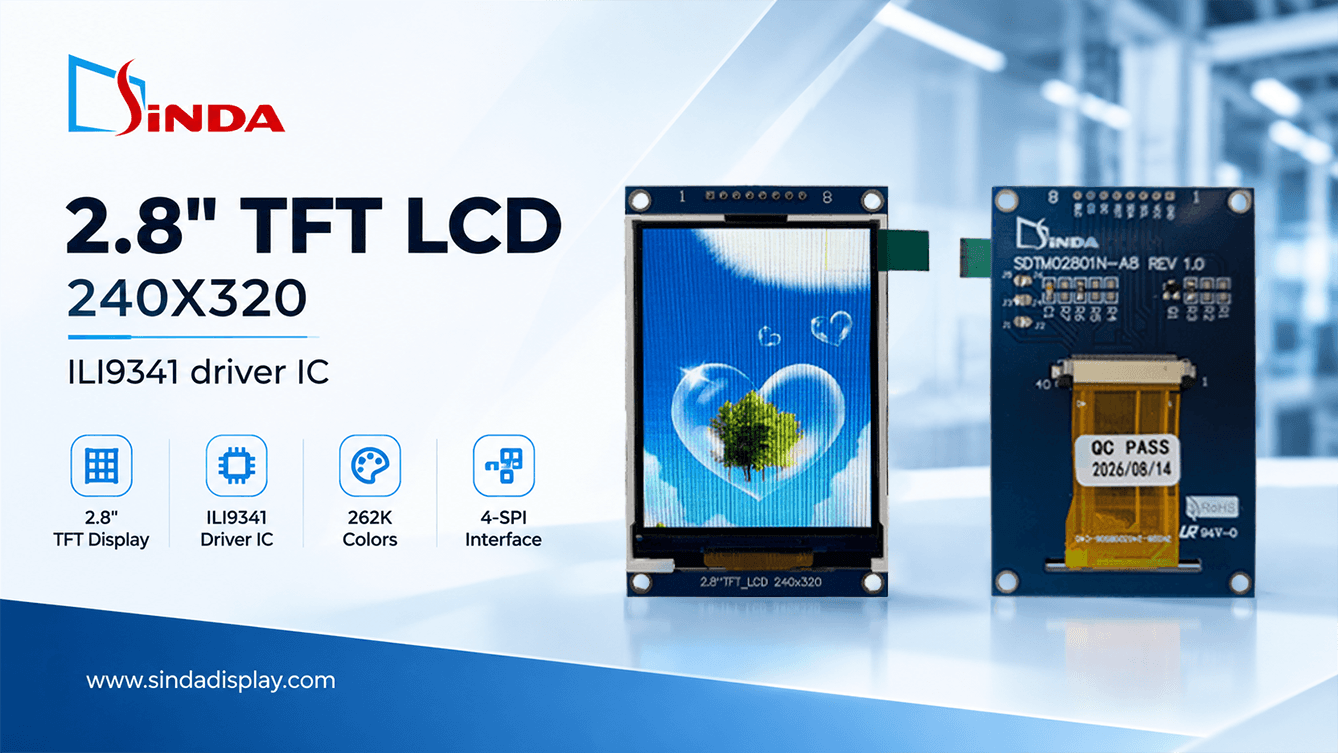
Item | Specification |
Size | 2.8" |
Resolution | 240 × 320 |
Colors | 262K |
Driver IC | ILI9341 |
Interface | 4-wire SPI |
Logic voltage | 3.0 V |
Operating temperature | -20 °C to +70 °C |
Max. thickness | 3.60 mm |
Viewing direction | 12 o'clock |
· 4-wire SPI needs few MCU pins. That leaves I/O for sensors and buttons.
· 3.60 mm thickness fits slim housings.
· 3.0 V logic sits inside the IC's 1.65–3.3 V range. Confirm the level match with your MCU.
· 12 o'clock viewing direction: confirm it matches how the operator views the device.
Instrument screens mostly show readings, menus and simple trends. That pairs well with partial refresh plus DMA.
See the 2.8" module in action: watch the product video on YouTube.
From Dev Board to Production: What to Check Before You Order
A screen that works on your bench is not yet a screen you can ship.
Pre-Quote Spec Checklist
· Size and active area. Match your enclosure and bezel.
· Interface and pin definition. Confirm SPI, 8080 or RGB, and the FPC pin order.
· Logic voltage. Match it to your MCU.
· Brightness (cd/m²). State the real lighting condition, not the lab one.
· Viewing direction. Say which side the operator stands on.
· Temperature. Give your real operating and storage range.
· Backlight lifetime. Ask for hours, not adjectives.
· Touch. Decide now: none, resistive or capacitive.
· Annual volume. Suppliers plan around it.
The ILI9341 has no touch function. Touch is a separate layer with its own controller. If you need it, review our Touch Panel options together with the display.
Common Pitfalls When Moving from Prototype to Volume
· Hobby-grade modules. A dev module may not publish full specs or a stable build.
· Untested environment. Bench results rarely show high-temperature or outdoor behavior.
· Late touch decision. Adding touch later changes stack height and cover design.
· Spec drift. The module you tested must match the module you receive. Ask for a locked specification.
Custom ILI9341 TFT Modules from Sinda Display
Sinda Display focuses on industrial display solutions. We build COB, COG, OLED and TFT displays and touch panels for non-consumer equipment. The goal is steady quality and sensible cost.
For a QVGA-class TFT project, custom work can cover panel size and outline, FPC length and connector, backlight, touch integration with cover glass, and interface and pin definition. Our custom solutions page explains the options and the development flow. Not every parameter can be changed on every model.
ILI9341 Models in Our TFT Range
Four ILI9341-based parallel modules are listed in our TFT series. All are 240×320 and run from -20 °C to +70 °C. The 2.8" SPI module above is also available.
Model | Size | IC | Interface | Outline (mm) | Active area (mm) |
SDT02401N-A37 | 2.4" | ILI9341C | Parallel | 42.72 × 60.26 × 2.30 | 36.72 × 48.91 |
SDT02406N-A40 | 2.4" | ILI9341V | Parallel | 42.72 × 60.26 × 2.30 | 36.72 × 48.91 |
SDT02803N-A16 | 2.8" | ILI9341V | Parallel | 50.00 × 69.20 × 2.20 | 43.20 × 57.60 |
SDT02806N-A37 | 2.8" | ILI9341V | Parallel | 50.00 × 69.20 × 2.20 | 43.20 × 57.60 |
Need SPI in other sizes? Our 2.4" SPI models (SDT02401N-A10, -B16, -B18, SDT02402N-A10) and 3.2" SPI models (SDT03217N-A10, SDT03218N-A14) use the ST7789 family instead. Pick the IC by the interface you need, not by the name alone.
Ready to check your design? Contact our team with your size, interface, environment and volume. We will tell you what fits.
FAQ
Q: What interfaces does the ILI9341 support?
A: Parallel 8/9/16/18-bit (8080 series), RGB 6/16/18-bit and 3/4-line SPI. A module exposes only what its design routes out. Our ILI9341 modules come in parallel and 4-wire SPI versions.
Q: Is 240×320 enough for an industrial display?
A: Yes, for simple status, menus and numeric readouts. For dense content, move to a larger panel or higher resolution.
Q: Does an ILI9341 module include touch?
A: Not by itself. Touch is a separate layer and controller. Confirm it in the module spec.
Q: Can I run it at 3.3 V?
A: Yes. The IC logic runs from 1.65 V to 3.3 V. Our 2.8" SPI module uses 3.0 V logic. Some boards add a regulator, so check your module.