

How to Choose the Right Display for a Fire Alarm Control Panel
09.16.2026
When engineers design a fire alarm control panel (FACP), most of the attention goes to the circuit board, the power supply, and the notification appliance circuits. The display often gets treated as an afterthought. That's a mistake.
A fire alarm control panel's display is the first thing a technician, a building manager, or a firefighter looks at during an emergency. If it's hard to read, slow to update, or fails during a power event, the consequences go well beyond a warranty claim. Choosing the right display technology — and getting it properly customized — is a design decision that deserves the same rigor as any other safety-critical component.
This guide walks through what FACP manufacturers and design engineers need to know when selecting a display: the technology options, the design considerations tied to fire safety standards, and how the customization process actually works.
What Role Does the Display Play in a Fire Alarm Control Panel?
Fire Alarm Control Panel (FACP): the central processing unit of a fire alarm system. It receives signals from smoke detectors, heat detectors, and manual pull stations, then triggers notification appliances and logs system status.
The display is how that processing becomes information a human can act on. Two display contexts matter most:
· Main panel display — shows real-time system status: Normal, Trouble, Supervisory, or Alarm, plus the specific zone or point where an event originated.
· Remote annunciator display — a secondary display, often placed near a building entrance, that mirrors the main panel's status so first responders don't need to locate the primary panel.
Both displays are held to a higher bar than a typical industrial HMI screen, because fire alarm systems are safety-of-life equipment. In the U.S., UL 864 governs control units for fire alarm systems and effectively assumes the panel can communicate alarm and trouble conditions clearly and immediately. In Europe, EN 54 sets equivalent expectations. NFPA 72 further requires that battery backup sustain the system — including its display — for a minimum standby period, commonly 24 hours, plus several minutes of full alarm operation on battery power alone.
That last point is where display selection stops being a cosmetic decision. A display that draws too much current, or that becomes unreadable at low voltage, directly threatens the system's ability to meet its standby requirement. This is exactly the kind of design constraint our Custom Solution team works through with fire and life-safety equipment manufacturers.
Segment LCD, Graphic COG LCD, or TFT — Which Display Technology Fits Your Panel?
Three display technologies cover most FACP applications. Each fits a different level of information density and a different power budget.
Display Type | Typical Use in FACP | Power Draw | Viewing Angle | Relative Cost | Best Fit |
Segment / Character COG LCD | Basic status + zone number display | Very low | Moderate, wide with proper polarizer | Lowest | Entry-level panels, remote annunciators |
Graphic Dot-Matrix COB/COG LCD | Multi-line text, custom labels, simple icons | Low | Wide viewing angle available | Moderate | Mid-range panels needing descriptive alarm text |
TFT Display | Full-color graphics, floor maps, touch interaction | Higher | Excellent, wide-angle standard | Highest | Advanced/networked panels, touchscreen annunciators |
Character-Type COG LCD: Built for Reliable Basic Status Display
A character or segment-type COG LCD shows fixed or semi-fixed information — zone numbers, alarm/trouble/normal status, simple alphanumeric messages. Because it draws very little current, it's the technology most compatible with the long battery standby windows FACPs must meet. It's also mechanically simple, which supports the long service life fire safety equipment is expected to have. This is why most conventional and mid-tier addressable panels on the market still rely on it. See our COG LCD Display product line for reference specifications.
Graphic Dot-Matrix LCD: For Panels That Need to Say More
When a panel needs to display full custom text strings — a device location description, an event log, or a multi-language message — a graphic dot-matrix LCD is the practical step up. It still runs on low power relative to color displays, but gives engineers pixel-level control over layout, which matters for panels that display something like a simplified zone map.
TFT Display: For Touch-Enabled and Networked Panels
Higher-end networked fire panels, building integration workstations, and touch-enabled remote annunciators increasingly use small to mid-size TFT displays. They support full color, graphic zone maps, and touch input — but at meaningfully higher power draw. For this reason, TFT is typically reserved for panels with a stronger primary power path, or where battery standby calculations have already accounted for the higher load. Our TFT Display line covers the sizes and interface options most commonly requested for this kind of application.
Key Design Considerations When Selecting a Display for FACP Applications
Beyond raw technology choice, several design factors determine whether a display will actually work in a fire alarm application:
· Standby power draw matters more than active power draw, since panels sit in standby mode most of their service life.
· Operating temperature range should cover unconditioned electrical rooms, not just office environments.
· Backlight brightness and contrast need to remain readable in dim mechanical rooms and bright lobby entrances alike.
· Custom character sets and labels are often required to match a manufacturer's existing panel firmware and terminology.
· EMI/EMC shielding needs to be considered early, since fire panels sit near notification circuits and power supplies.
· Long-term supply stability is essential — a fire panel design can stay in production for a decade or more, and the display needs to be sourced reliably for that entire lifecycle.
Q: Is LCD or LED better for a fire alarm control panel display? A: They serve different purposes. LED indicators are best for simple, high-visibility status signals (Power, Alarm, Trouble). LCD is better when the panel needs to communicate specific information — zone descriptions, event details, or custom text — rather than just a status light.
Customizing a Display for Fire Alarm Panel Manufacturers: What the Process Looks Like
Off-the-shelf display modules rarely fit a fire panel's mechanical envelope or firmware exactly. Most FACP manufacturers work with a display supplier on some level of customization, which typically covers:
1. Outline and mounting dimensions — matching the display to an existing enclosure cutout or bezel.
2. Custom character set or icon set — building in the specific alarm/trouble/supervisory terminology and symbols the panel firmware expects.
3. Connector and interface matching — aligning pin-out and interface protocol with the existing control board design.
4. Branding elements — logo placement or custom viewing area tinting where required.
Case Study: Graphic COG LCD for a Fire Alarm Control Panel
A fire alarm panel manufacturer needed a display that could show multi-line status text, custom zone labels, and simple graphic icons — without adding the power overhead of a color screen. Sinda Display supplied a COG graphic LCD built to the following specification:
Parameter | Specification |
Model | SDGG12864-68 |
Display Type | COG Graphic LCD |
Resolution | 128 × 64 pixels |
Controller IC | ST7565R |
Interface | Parallel / SPI |
Module Dimensions | 77.40 × 52.40 × 6.00 mm |
Active Viewing Area | 66.52 × 33.24 mm |
The COG (Chip-On-Glass) structure removes the need for a separate PCB behind the glass, keeping the module thin enough to fit inside a compact panel enclosure without redesigning the housing. The 128×64 graphic resolution gave the manufacturer enough pixel control to lay out multi-line alarm descriptions and simple zone icons — the exact use case described above for graphic dot-matrix displays — while the ST7565R controller and dual parallel/SPI interface let it drop into the existing control board design with minimal firmware rework. Because it's a monochrome graphic LCD rather than a color TFT, standby power draw stayed low enough to support the panel's battery backup requirements under NFPA 72.
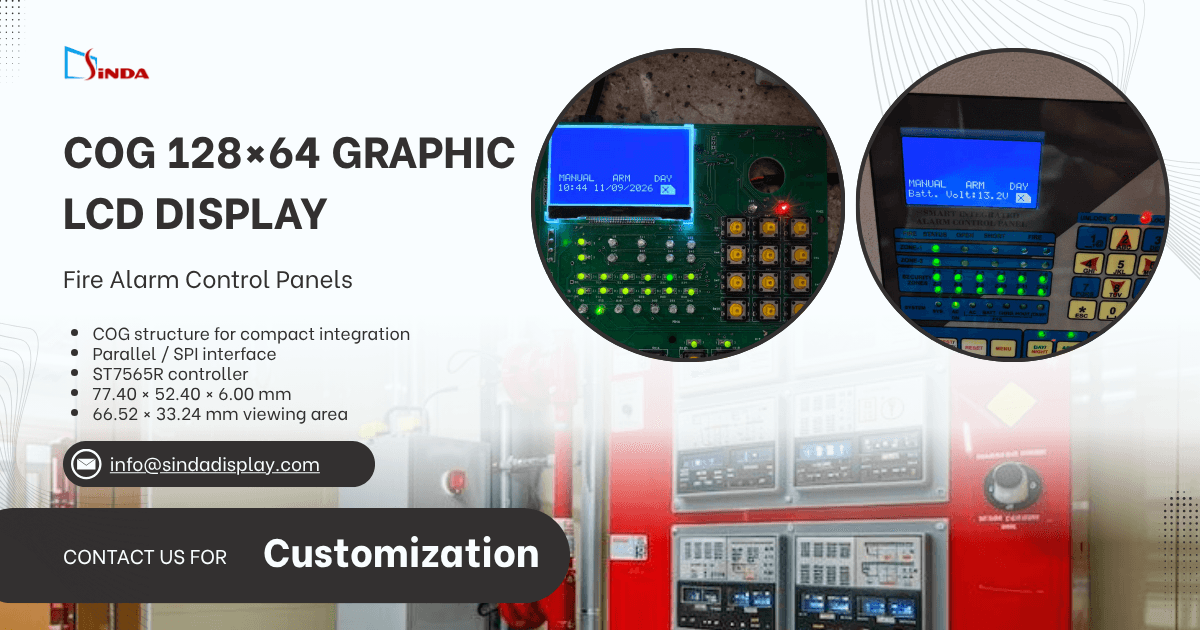
This kind of collaboration is what our Custom Solution process is built around — starting from a manufacturer's existing panel design rather than asking them to redesign around a standard part.
FAQ: Common Questions About Fire Alarm Control Panel Displays
Q: What certifications does a display need for use in a fire alarm control panel?
A: The display itself is not independently UL- or EN 54-listed — certification applies to the complete control unit. However, the display's power draw, temperature range, and reliability data need to support the overall panel's certification testing, so working with a supplier who understands these downstream requirements helps avoid redesign later.
Q: Can a display be customized for a low production volume?
A: Yes. Fire panel product lines often run at lower volumes than consumer electronics, so most display customization programs are structured around MOQs and lead times realistic for industrial and safety equipment manufacturers rather than consumer-scale production.
Q: How long should a fire alarm panel display last in the field?
A: Fire alarm systems are frequently specified with service lives of 10 years or more. Display technology selection should account for this — favoring proven, long-supply-cycle components over the newest available part.
Choosing a display for a fire alarm control panel isn't just a component decision — it's a safety and compliance decision. Whether your panel needs a low-power character LCD, a graphic dot-matrix display, or a full-color TFT, getting the specification and customization right from the start avoids costly redesigns later. Contact Sinda Display to talk through your panel's display requirements.